Our teacher, Mrs. Gibson, does the DFI every Wednesday. One of the activities she had to do was the digital dig. When she came back to school we had to complete the same digital dig. This took us about 2 hours spread over two weeks. If you are unsure what the random drawing is I'll explain: We had to create a drawing showing something we are looking forward to learning this year. I'm looking forward to learning more about school. I enjoyed getting to create the drawing. I found it challenging to create a poster for the last thing. To be BTB (Better Than Before) I could make my poster more detailed.
Showing posts with label Cyber Smart. Show all posts
Showing posts with label Cyber Smart. Show all posts
Monday, 12 April 2021

Tuesday, 23 March 2021
LM - Tidy Drive
Since I had done the post we needed to do, I had to complete one of the cyber smart challenges. I picked the one titled 'Tidy drive'. You had to sort the fake drive before sorting your personal drive. I enjoyed getting to tidy MY drive because it was already tidy. I found it challenging with some of the fake drive because I didn't know what went in writing and what went in reading with things like 'Book review'. To be BTB (Better Than Before) I could put some of my folders into other folders.
Friday, 26 February 2021
Kawa of Care
When we learnt about the Kawa of Care we had to create a poster about one of the rules. I was sick when we did this, but I did it anyway. I chose the rule 'Keep food and drinks away from your Chromebook'. I enjoyed getting to design it. I found it challenging to get a photo of a Chromebook because it had to be png and free to use. To be BTB I could have spent more time working on it but I couldn't because I was in a hurry.
Saturday, 2 January 2021
SLJ - Which Face Is Real
I got 9/10.

The main clue in this one is the glasses, the ones on the right have light reflecting off them which means there is flash being used on the camera, or there is light in front of them.
The man on the left has a weird neck as well.
Monday, 29 July 2019
Transformation using grids
Today we found an accredited image on Explore and selected it to use on our page. We then put a 5x5 grid on it so we could copy the image and make it original. Mrs Minehan selected the first two images so we could understand the process, then we got to choose our own image.
I found the first one hard because there were so many small pieces.
The second one was hard because there was shading.
I chose the image of the tree because it looks the best.
Have you ever tried to transform an image using a grid? How did you find the process?

I found the first one hard because there were so many small pieces.
The second one was hard because there was shading.
I chose the image of the tree because it looks the best.
Have you ever tried to transform an image using a grid? How did you find the process?

Monday, 10 June 2019
MyMaps
We learnt how to use Google MyMaps and then we got to look for where we went on camp. For each place we found we had to name it, write something about it and find an image of it so that the pin on our map had information on it. This is my finished map of Wellington. Have you ever used MyMaps to locate places in your community?
Monday, 27 May 2019
Creating Music
Recently our class got to go to Wellington for camp. During the activities, we got to create a piece of music using loops online at Capital E in Wellington. It was amazing my music is a classical piece with rock in the middle. I found it challenging because you can only use 10 tracks each track was one piece of music. There were so many types of music to chose from Vocals, Jazz, Classical and so many more. At the end we all got to share, everybody else's was amazing. I hope you like my piece of music.
Music

Music
Year 6's Doing music making.

Monday, 25 February 2019
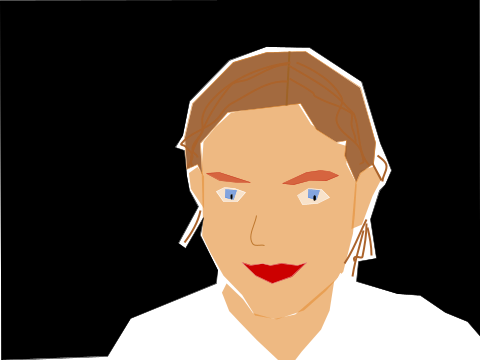
Self drawing
WALT: make a self-portrait using google drawings. I enjoyed getting to use the polyline tool but it was challenging to use it. I might have my hair out next time. We can use this to make online drawings and charters for animations.

Wednesday, 30 May 2018
Tuesday, 13 June 2017
benefits of being in the right place at the right time online
WALT to make a poster showing why we should be in the right place at the right time online
I enjoyed changing the background colours and fonts
I found challenging to think of ideas to write on my poster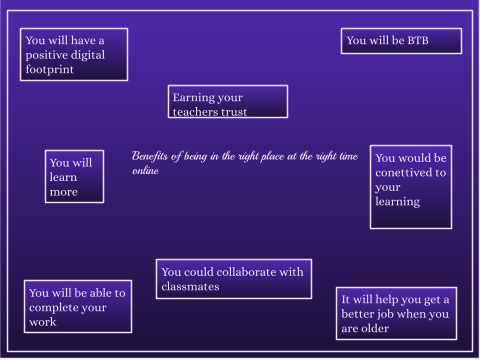
I enjoyed changing the background colours and fonts
I found challenging to think of ideas to write on my poster
Friday, 26 May 2017
how to embed a slide
WALT teach others how to embed a slide on our blog
I found it enjoyable finding new backgrounds on the slide.
I found it challenging to work on the slide at the same time as Grace.
Tuesday, 23 May 2017
how to embed a slide on our blog
WALT teach others how to embed a slide on our blog
I found it enjoyable finding new backgrounds on the slide.
I found it challenging to work on the slide at the same time as Grace.
I found it enjoyable finding new backgrounds on the slide.
I found it challenging to work on the slide at the same time as Grace.
Thursday, 13 April 2017
Lucy's Chromebook top tip
WALT.to make a DLO showing how to do something on a Chromebook.
I enjoyed making the video.
I found it challenging to talk because I am shy.
I enjoyed making the video.
I found it challenging to talk because I am shy.
Subscribe to:
Posts (Atom)